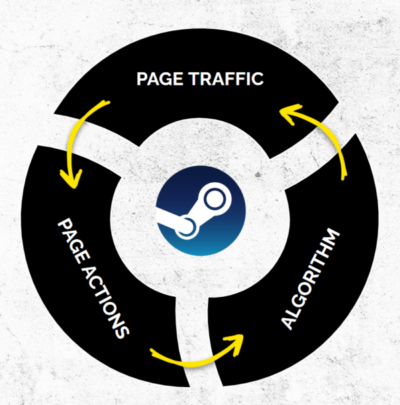
Your store page is pivotal to your game’s commercial success across its entire lifecycle. On Steam, every time a player lands on your page and clicks Wishlist or Buy, the platform’s algorithm registers strong conversion performance and, according to Valve’s own documentation, rewards your title with greater organic visibility across the storefront.
Why does this matter so much to us at Green Man Gaming?
First, your Green Man Gaming store page is built directly from your Steam page. To keep onboarding as seamless as possible, we pull your existing copy, screenshots, and trailers straight across (though you are always welcome to customise your GMG assets separately if you prefer; just let our team know whenever you make updates).
Second, when our Marketing Services team runs pre-launch wishlist campaigns for partners, we drive traffic directly to your Steam page before pivoting at launch to send players to both Steam and Green Man Gaming.
Ultimately, a high-converting store page protects your marketing budget. Whether you are investing in paid media, creator collaborations, or retail campaigns, strong page conversion minimises wasted spend and ensures the players you attract actually convert.
Below is an easy-to-follow breakdown of how studios and publishers can fine-tune their Steam pages; from initial click-through to final purchase.
1. Win the Click Before the Visit with High-Impact Capsule Art
Before a player ever evaluates your screenshots or trailer, your Steam capsule has to earn the click across search results, discovery queues, and curated sale pages. Because small capsules appear at tiny thumbnail dimensions, intricate illustrations often turn into visual clutter.
Keep typography crisp and legible: Ensure your game’s logo is readable even on the smallest header and search capsules, and avoid crowding the image with taglines, review quotes, or extra text.
Communicate genre and mood instantly: Use strong colour contrast, a clear focal point, and distinctive art direction so players immediately know what kind of experience you are offering.
Use Artwork Overrides strategically: Steam’s Artwork Overrides allow you to temporarily swap in event-specific capsules during major updates, seasonal sales, or livestreams, signalling fresh momentum without permanently altering your core branding.
2. Master the Five-Second First Impression
Once a player lands on your store page, you have roughly five seconds to capture their interest before they bounce. Because many shoppers scan screenshots before ever pressing play on a video, your static visuals must communicate the core experience immediately; especially your first four screenshots, which appear across Steam hover previews.
Be sure to mark at least four screenshots as Suitable for All Ages in Steamworks so your game isn’t excluded from storefront hover carousels.
Screenshot Pillar
What to Showcase
Why It Converts
Core Gameplay Loop
The primary actions players repeat throughout a session, including clear in-game UI/HUD elements.
Lets viewers immediately identify the genre and understand how the game actually plays.
Progression Systems
Skill trees, weapon upgrades, base expansion, or unlockable abilities.
Signals depth, replayability, and long-term player agency beyond the opening minutes.
Visual Variety
Distinct biomes, enemy archetypes, weather states, or varied gameplay scenarios.
Reassures buyers that the experience evolves and avoids repetitive environments.
Emotional Peaks
High-stakes boss encounters, dramatic set pieces, or standout co-op moments.
Creates excitement and gives players a memorable hook worth wishlisting for.
Keep screenshots clean and compliant: Valve strictly enforces clean screenshot guidelines; avoid placing review quotes, award stamps, or promotional text overlays onto your official Steam screenshots. Save social-proof badges for your external paid media and social creatives instead.
3. Hook Players Immediately with Gameplay and Copy
Prospective buyers want proof that your game is fun to play. Holding back gameplay behind lengthy lore intros or studio logos costs valuable attention, while generic copy fails to differentiate your release.
Lead trailers with action (and keep them tight): Show real gameplay within the first five seconds of your main trailer, keeping the total runtime around 60–90 seconds. Leaving the HUD visible helps viewers orient themselves instantly, confirming genre conventions and core mechanics without explanatory text cards. Save publisher and studio logos for the end card.
Include strong CTAs early: Add the game name and clear calls to action such as; Wishlist Now, Play the Demo, or Buy Now at the start of your trailers and external video assets, not just at the end. Long Youtube videos might mean not everyone who plays your video ad will see the call to action if you don't start with it.
Make your Short Description work harder: Positioned directly beneath your main capsule, the 300-character Short Description is prime real estate. Lead with your unique player fantasy and core hook rather than vague lore or boilerplate text that repeats your long description.
Keep your “About This Game” section focused and compliant: Players rarely read walls of text, so embed crisp, well-compressed animated gameplay GIFs to demonstrate combat feel, mechanics, or building systems in motion. Under Valve’s store guidelines, keep this section dedicated strictly to your game.
Highlight your USPs seamlessly: Showcase key selling points visually. For instance; co-op titles, displaying cross-play platform logos in your marketing assets immediately signals to prospective buyers that the game will have an active player base and that they can squad up with friends outside PC.
Leverage player advocacy in your campaigns: People are like sheep and follow the crowd... If you have hit 100k wishlists or earned standout press and player praise, feature those milestones on your external creative assets and announcements, social proof sparks curiosity and encourages browsing players to explore further. Create a bit of FOMO!
4. Tag Strategically and Maintain Tag Hygiene
Even the strongest creative assets will underperform if Steam serves your page to the wrong audience. Accurate store tagging directly shapes how Steam’s discovery systems categorise your title and determines whether you appear in the high-converting “More Like This” sections of relevant games.
Prioritise your top five tags: Steam weights your opening tags most heavily. Make sure your first five slots reflect your specific sub-genre and core mechanics (such as Deckbuilder, City Builder, or Tactical RPG) rather than broad, crowded labels like Indie or Action.
Avoid “tag stuffing” beyond 12–15 tags: You do not need to fill all 20 tag slots. Adding loosely related tags sends mixed signals to Steam’s recommendation engine and can drag down your impression-to-click rate.
Benchmark against successful peers: Audit the tag profiles of top-performing titles in your niche. Aligning your tag order with proven genre leaders helps Steam’s recommendation engine connect your game with players who already buy similar experiences.
Actively moderate player-suggested tags: Once your store page is live, players might suggest their own tags. Review and moderate community tags regularly in Steamworks so off-target labels don’t pull your game into the wrong recommendation carousels.
5. Build Trust with Demos, Social Proof, and Localisation
Once a player is interested, friction and uncertainty are the biggest barriers to a wishlist or purchase. Industry benchmarks show that Coming Soon pages typically convert visits to wishlists at around 8–12% so if you can convert 20% to purchases it gives you finance team a good indicator for how your release window might look like. Removing doubt pushes your page above those medians:
Launch playable demos early and keep them live after Next Fest: A polished demo lets players validate the gameplay loop first hand. Because Steam Next Fest has grown increasingly crowded to say the least!, launch your demo and marketing beats well ahead of the festival so you enter with established momentum. Afterward, consider leaving a trimmed demo live permanently. Steam increasingly treats demo-to-wishlist and demo-to-purchase conversion as an ongoing organic visibility signal.
Hit the 10-review milestone fast at launch: Steam does not display an aggregate review score (such as Positive or Very Positive) until a game reaches 10 direct user reviews. Mobilising your community, creators, and press contacts to leave honest reviews early removes the “No user reviews” hurdle that makes shoppers hesitate and pairing that push with wider Day-1 retail distribution ensures you capture maximum launch-week awareness and sales velocity across every storefront.
Nurture Followers alongside Wishlists: While wishlists get the spotlight, Followers correlate strongly with long-term post-launch sales. Followers receive notifications whenever you publish Steam News or Event updates, keeping your game active in discovery feeds well beyond launch week.
Localise store copy and assets: Translating your store page, tags, and trailer captions into key PC gaming languages unlocks international discovery and boosts conversion in non-English territories. Simplified Chinese, Japanese, and Korean are especially impactful, though broader localisation pays dividends.
Keep buying options simple: Per Steamworks best practices, avoid overly complicated edition structures or confusing DLC bundles at launch, clear pricing and straightforward bundles convert best.
6. Measure, Iterate, and Track External Traffic
Your Steam page should never be treated as “set and forget.” Publish your Coming Soon page as soon as you are ready so you can start capturing wishlists and testing what resonates before launch. However, avoid going live too early before your core assets are in place—if you only have empty environments built without characters, UI, or boss encounters, wait until your page can put its best foot forward. Finding that “Goldilocks” launch window makes all the difference.
Use Steamworks UTM Analytics (with realistic expectations): Whenever you drive traffic from social media, creator campaigns, PR beats, Google, or external storefronts, append UTM parameters (utm_source, utm_medium, and utm_campaign at a minimum) so you can see which channels generate wishlists and purchases rather than empty clicks. Just keep in mind that Steam’s reporting has known tracking blind spots (often referred to as the “Steam UTM black hole”) where logged-out or browser-to-client sessions can strip UTM tags, so treat UTM figures as directional rather than absolute.
Benchmark CTR and test one change at a time: Establish your baseline Session-to-Wishlist conversion rate and Impression-to-Click (CTR) before running marketing campaigns (as a rule of thumb, CTR below 0.5% risks impression throttling, 1–2% holds steady visibility, and 3%+ triggers stronger algorithmic promotion). Monitor metrics over one- to two-week windows whenever you update capsule art, trailer order, or screenshots so you know what actually moved the needle.
Ready to Scale Your PC Distribution and Visibility?
A high-converting Steam page lays the foundation for every campaign you run from pre-launch wishlist drives to post-launch sales beats. At Green Man Gaming, our Distribution and Marketing Services teams partner with developers and publishers worldwide to connect great PC games with engaged global audiences, extending reach beyond the Steam ecosystem while amplifying store performance.
Want to discuss how we can support your upcoming release? Get in touch.